OverviewRingkasan
One app, two rolesSatu app, dua peran
Install the same app everywhere and choose a role the first time you open it. You can switch roles anytime from the top of the screen. Install app yang sama di semua device, lalu pilih peran pas pertama buka. Peran bisa diganti kapan aja dari atas layar.
Controller
Monitors and controls every cloud phone over the internet. Just needs a connection. Pantau & kontrol semua cloud phone lewat internet. Cuma butuh koneksi.
Cloud
Runs Roblox and does the actual rejoining — driven by your controller. Jalanin Roblox dan ngelakuin rejoin-nya — dikontrol dari controller.
ArchitectureArsitektur
How it worksCara kerja
Both roles sign in with the same license key. The LimeHub relay pairs your controller with your cloud phones automatically — no IP addresses, no port forwarding, works through any cloud network. Dua peran login pakai license key yang sama. Relay LimeHub otomatis nyambungin controller dengan cloud phone kamu — tanpa setting IP, tanpa port forwarding, jalan di jaringan cloud apapun.
Your phoneHP kamu ⇄ LimeHub relay ⇄ Cloud phonesCloud phone
The key doubles as the pairing token — devices on the same key find each other.Key-nya sekaligus jadi token pairing — device dengan key yang sama saling nemu.
Before you startSebelum mulai
RequirementsKebutuhan
| RolePeran | Device | NeedsButuh |
|---|---|---|
| Controller | Your phone — Android 8+HP kamu — Android 8+ | Internet. No root.Internet. Tanpa root. |
| Cloud | Cloud phone — Android 8+ | Root (su) and Roblox installed.Root (su) dan Roblox keinstall. |
Most cloud phones run Android 10 and ship rooted, so they work out of the box. Kebanyakan cloud phone Android 10 + udah root, jadi langsung jalan.
Step 1Langkah 1
Install the appInstall app-nya
- Download the LimeHub Rejoiner APK from your seller.Download APK LimeHub Rejoiner dari penjual.
- Install it on your phone and on each cloud phone — it's the same APK.Install di HP kamu dan di tiap cloud phone — APK-nya sama.
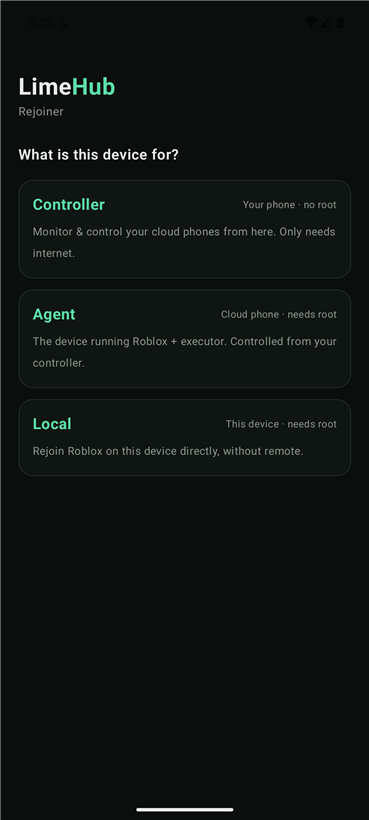
- On the first launch, choose a role: Controller on your phone, Cloud on each cloud phone.Pas pertama buka, pilih peran: Controller di HP kamu, Cloud di tiap cloud phone.
Step 2Langkah 2
Set up the controllerSetup controller
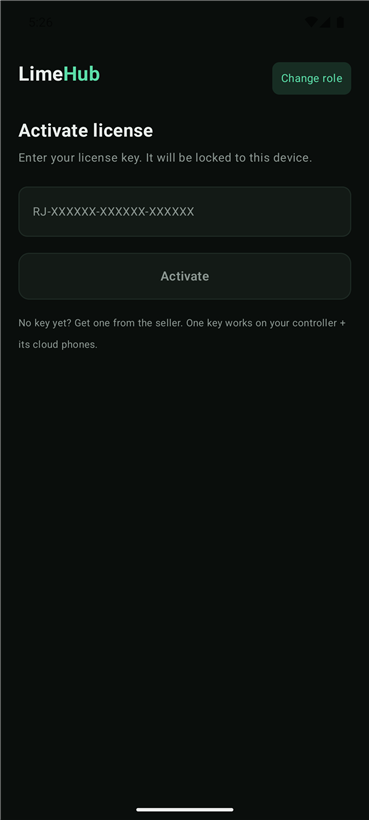
- Open the app on your phone → pick Controller.Buka app di HP kamu → pilih Controller.
- Enter your license key and tap Activate. The key locks to this phone.Masukin license key → tap Activate. Key terkunci ke HP ini.
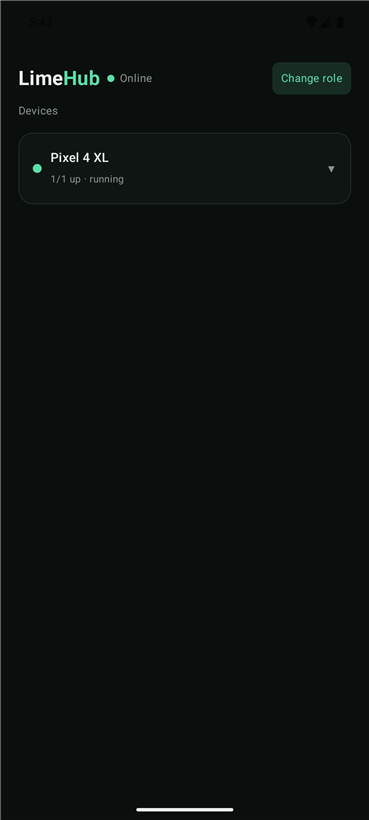
- You land on the Devices screen. Cloud phones show up here once they're running.Kamu masuk ke layar Devices. Cloud phone muncul di sini begitu jalan.
Step 3Langkah 3
Set up a cloud phoneSetup cloud phone
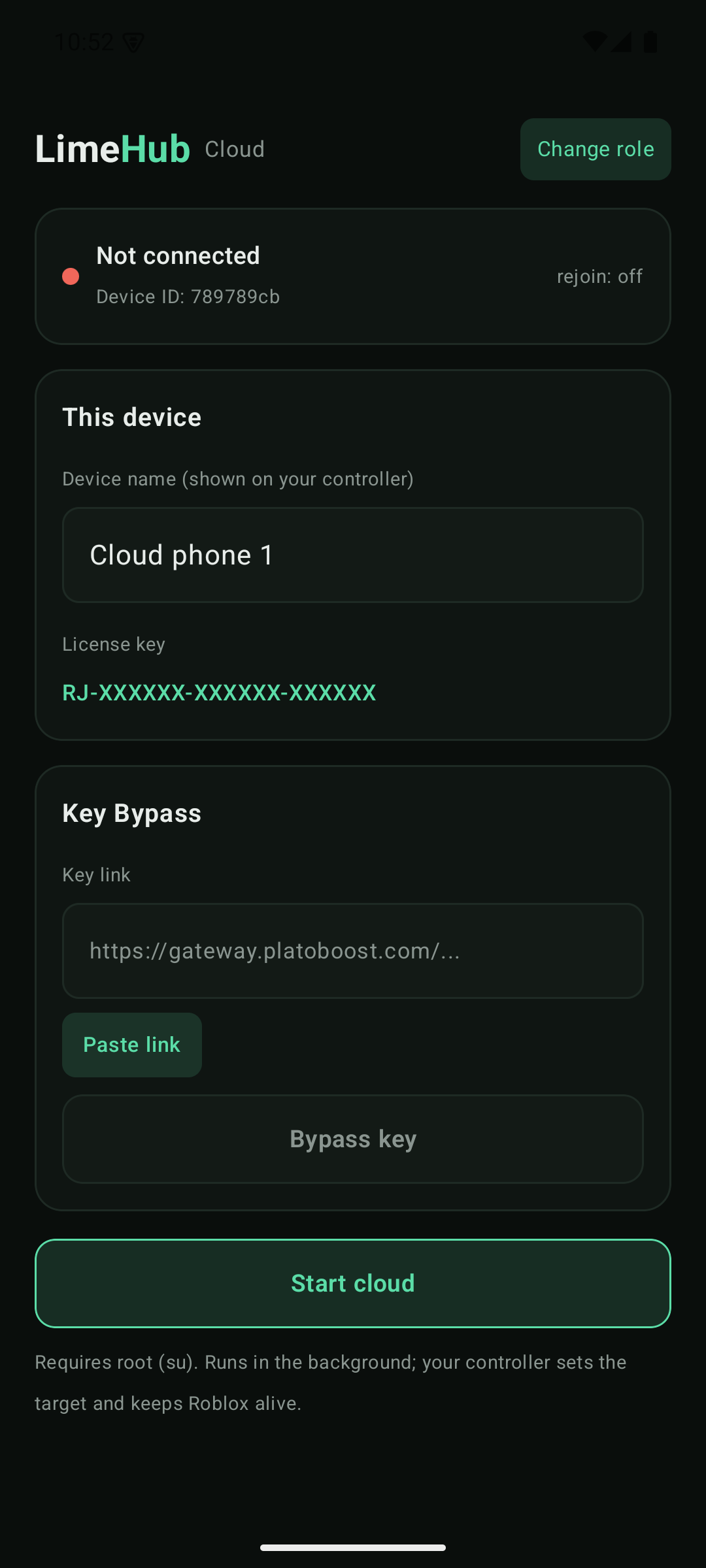
- On the cloud phone, open the app → pick Cloud.Di cloud phone, buka app → pilih Cloud.
- Enter the same license key → Activate.Masukin license key yang sama → Activate.
- Give it a name so you can tell it apart on your controller.Kasih nama biar gampang dibedain di controller.
- Tap Start cloud and grant root (su) when prompted.Tap Start cloud + kasih izin root (su) pas diminta.
Step 4Langkah 4
Run a gameJalankan game
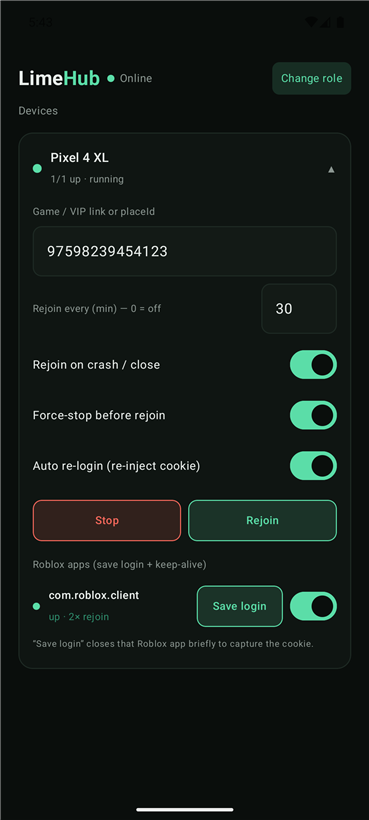
On your controller, tap a device to open its controls:Di controller, tap device buat buka kontrolnya:
- Search a game by name and pick it, or paste a game link, private server link, or placeId.Cari game pakai nama lalu pilih, atau tempel link game, private server link, atau placeId.
- Set Rejoin every (min), or
0to only rejoin on a crash.Set Rejoin every (menit), atau0buat rejoin pas crash aja. - Flip Rejoin on crash, Force-stop before rejoin, and Auto re-login to taste.Atur toggle Rejoin on crash, Force-stop before rejoin, dan Auto re-login sesuai mau.
- Tap Start. The cloud phone opens the game and keeps it alive.Tap Start. Cloud phone buka game-nya + jaga tetap nyala.
Auto re-login
Tap Save login on a Roblox app to capture its session. With Auto re-login on, the cloud phone re-injects it on every rejoin, so a logged-out account comes back on its own. Tap Save login di app Roblox buat nyimpen sesinya. Kalau Auto re-login nyala, cloud phone inject ulang tiap rejoin, jadi akun yang ke-logout balik sendiri.
Stay AFKTetap AFK
Key alerts & one-tap bypassNotif key & bypass sekali tap
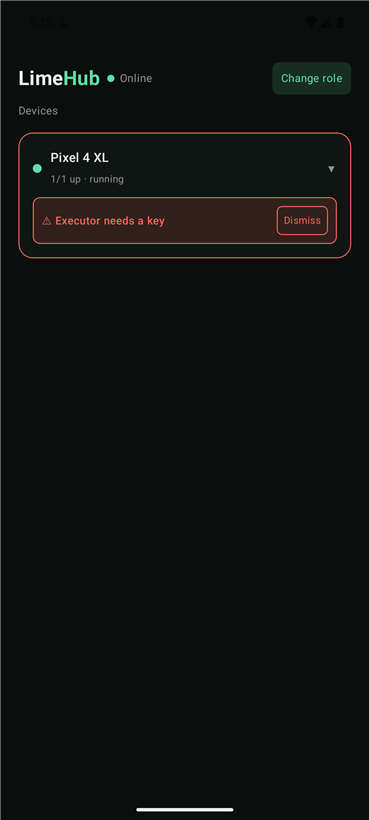
Executor keys usually expire about once a day. The moment a cloud phone's executor asks for a new key, that device turns red on your controller with “Executor needs a key” and you get a notification. Key executor biasanya expired sekitar sehari sekali. Begitu executor di cloud phone minta key baru, device itu jadi merah di controller dengan “Executor needs a key” dan kamu dapet notif.
Built-in Key Bypass: on that cloud phone, open the app, paste the key link and tap Bypass — your key is fetched automatically, no ads and no waiting. Paste it into the executor and you're back in. Ada Key Bypass bawaan: di cloud phone itu, buka app, tempel link key-nya, tap Bypass — key langsung diambilin otomatis, tanpa iklan, tanpa nunggu. Tempel ke executor, langsung masuk lagi.
LicensingLisensi
Device lock (HWID)Kunci device (HWID)
Your license key locks to one controller device the first time you activate it. This is what stops a single key from being shared across many people. License key kamu terkunci ke satu device controller pas pertama kali diaktifin. Ini yang bikin satu key gak bisa dipake rame-rame.
Controller / LocalController / Local
Locked to one device (its HWID). Activating the same key on another controller shows “already activated on another device.” Terkunci ke satu device (HWID-nya). Aktifin key yang sama di controller lain → muncul “already activated on another device.”
Cloud phonesCloud phone
Not affected by HWID. They share the same key — your plan includes 3 cloud phones by default, and you can swap them freely. Need more? Upgrade your key. Gak kena HWID. Pakai key yang sama — plan kamu udah termasuk 3 cloud phone default, bebas ganti-ganti. Mau lebih? Upgrade key kamu.
Moving to a new controllerPindah ke controller baru
Reset the HWID to unbind your key, then activate it on the new device. Your cloud phones keep running — only the controller binding is cleared. A reset has a short cooldown to prevent abuse. Reset HWID buat ngelepas key, terus aktifin di device baru. Cloud phone kamu tetep jalan — cuma binding controller yang dihapus. Reset ada cooldown singkat biar gak disalahgunain.
/resethwid in our server — it instantly unbinds the key you redeemed, no login needed.Lebih suka Discord? Jalanin /resethwid di server kami — langsung ngelepas key yang kamu redeem, tanpa login.HelpBantuan
TroubleshootingMasalah & Solusi
Set a game link or placeId first — Start stays disabled until there's a target.Set link game / placeId dulu — Start mati sampai ada target.
Use the same license key tap Start cloud and grant root (su) on that phone.Pakai license key yang sama tap Start cloud kasih izin root (su) di HP itu.
Make sure Roblox is installed and the cloud phone has root. It auto-detects the device's su type.Pastiin Roblox keinstall + cloud phone-nya punya root. Otomatis deteksi tipe su device-nya.
The key is locked to another controller. Reset the HWID (or /resethwid in Discord), then activate on this device — see Device lock.Key terkunci ke controller lain. Reset HWID (atau /resethwid di Discord), terus aktifin di device ini — lihat Kunci device.
Make sure the executor's key prompt is actually showing on that cloud phone. If it still doesn't trigger, contact your seller.Pastiin layar minta key executor beneran muncul di cloud phone itu. Kalau tetep gak kepicu, hubungi penjual.